

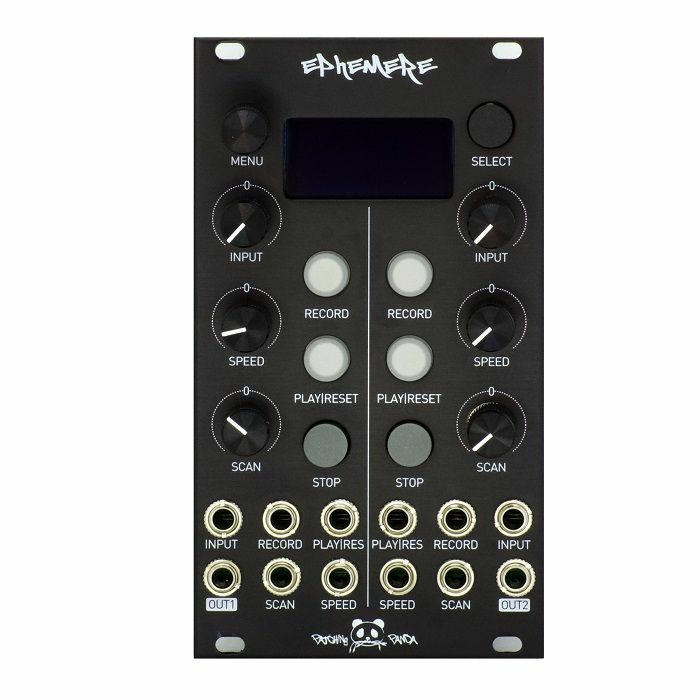
This is a high-resolution dual-channel recording interface for your signals mainly focused on recording control voltages. You can record from 1014 sec at 172Hz up to 4 sec at 44.1kHz of signal on each channel, change the playback speed and scan through the recorded CV.
There is a dedicated attenuverter pot for your incoming signals. When nothing is patched to the input you can use the input pot as an offset / cv generator and record pot movements into the module.
It's possible to save, load your signals and settings on the SD card up to 16GB of space.
There are 4 different recording modes to choose from to make more complex signals to prepare your live performances.
MENUS
You can navigate through the menu by pressing SELECT BUTTON (Holding SELECT plus rotating ENCODER you can scroll the menu too)
Pressing ENCODER you can go inside the selected menu, each menu fuction can be changed by rotating ENCODER plus pressing SELECT.
1. Channel: Switch channels 1 & 2 on the OLED display (Holding SELECT for 3 seconds you can swicth channels too)
2. Display: Switch display (live or playback)
a) Live: Live signal monitoring from DAC output
b) Playback: Recorded signal displayed on the OLED
3. Play: Select modes either loop or 1 shot
a) Loop: The playback of the signal will play in loop until STOP is pressed.
b) One shot: The playback of the signal will stop when it reaches the end or if STOP is pressed
4. REC: Select manual, sync, manual mult and sync mult
a) Manual: Pressing REC will start recording, pressing REC again will finish recording, automaticly will start playing.
b) Manual mult: Pressing REC will start recording, pressing REC again will finish recording, automaticly will start playing.
(If PLAY is pressed during recording, or trigger is received to PLAY input recording proccess will be paused, pressing PLAY again or receiving a trigger to PLAY input jack will continue recording)
c) Sync: Pressing REC will wait for a trigger from REC trigger input to start recording, when a second trigger is received to REC input again will finish recording
d) Sync mult: Pressing REC will wait for a trigger from REC trigger inputto start recording, when a second trigger is received to REC input again will finish recording (If PLAY is pressed during recording, or trigger is received to PLAY input recording proccess will be paused, pressing PLAY again or receiving a trigger to PLAY input jack will continue recording)
5. Record Sampling: Select between different sample rate modes and time length of recording
6. Play direction: 3 different play modes can be selected. Forward, backward, pendulum
7. CV Range: Change the offset of the incoming signal from -5 / +5V or 0 / 10V, it can also change the offset of the recorded signal
8. File Load: Loads signals saved on the SD card
9: File Erase: Erases signals saved on the SD card
10: File Save: Saves and names signals on the SD card
If you decide an equipment item is not suitable within 10 days of delivery, you can return it to us for a replacement or refund. Returns must be unused and in their original, undamaged packaging.
Some items are excluded from our money back guarantee, including:
• Computer software that has been unsealed or registered
• Any item that comes directly into contact with the nose, ears or mouth
To arrange a return, just contact our customer service department on 020 7424 2800 or email us at support@juno.co.uk
from Juno Records: Studio Equipment - New Releases https://ift.tt/34G4cga

Follow Juno Records
Juno Records delivering the inside scoop on the electronic music industry. Subscribe and get dialed in on what's really going on behind the scenes.
SPONSORS
Sourced by actual house heads who have supported the EDM scene, music, culture, and vibe collectively for decades. We're always dedicated to showing love and support for fellow artists, promoters, and supporters.
Lurid House Live and the Lurid's Playhouse formats each session for live broadcast. Enjoy the show.
ConversionConversion EmoticonEmoticon