

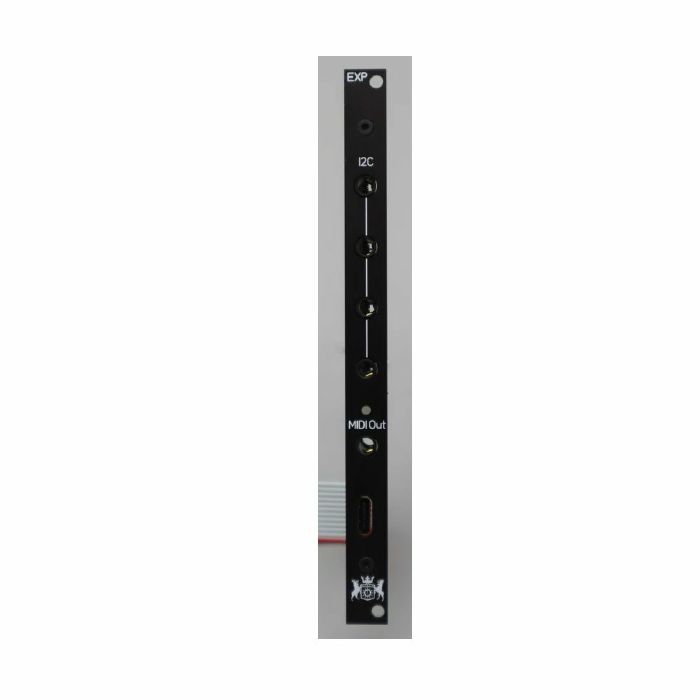
2HP Output Expander for Version 2.x XVI and F8R fader banks
Connecting to your device:
Simply connect the 12pin ribbon cable to the 12pin header on XVI / F8R. There is a key in the connector that will only allow the cable to be connected one way. Its fragile, so please exercise care when connecting. USB connectivity is for data only, the device will not power via USB, it must be connected to eurorack power at all times.
The 12pin header is available on 2.0 versions of F8R and XVI only (there will be a version number on the back of the module). The device can be used with 1.xx devices as well, the 12pin ribbon connector will fit on the 8pin header on those devices. Make sure the key is inserted into the keyway. When used on 1.xx device, only MIDI and I2C is available, the USB feature will NOT WORK ON 1.xx devices. The device does have a work around (below)
Operating instructions:
Activity LED: RED indicates start up, XVI and F8R have a 7 sec boot delay to allow for I2C communications to start correctly between devices. The LED will turn green when it is ready to use. LED will show activity (orange) when a fader is moved
MIDI: TRS A standard MIDI out. MIDI CC# can be configured for the TRS MIDI Out via web editor. Only 7bit CC MIDI messages are supported at this time
USB: USB MIDI OUT (only), class complaint USB MIDI driver. The USB MIDI can be configured via web editor independently of the TRS outputs so different CCs can be sent out via the TRS and USB MIDI
I2C: Tip SDA, Ring SCL. Each port has a corresponding header on the back for connecting modules via dupont cables. Maximum cable length is 15in (38 cm). Connecting devices via I2C is outside the scope of these instructions, please refer to the target device's manual for additional requirements.
Connecting EXP to 1.x devices:
Connect the 12pin connector to the 8 pin header making sure the key is located in the correct position. This will enable MIDI and I2C functionality, NOT USB
To enable USB functionality, a Micro USB break out cable is required and a 0.1" pitch right angle header has to be installed onto the EXP board. If you are unable to install the header, please contact Michigan Synth Works before purchasing and we can install one for you.
If you decide an product is not suitable within 14 days of delivery, you can return it to us for a replacement or refund. Returns must be unused and in their original, undamaged packaging.
Some items are excluded from our money back guarantee:
- Computer software that has been unsealed or registered
- Any item that comes directly into contact with the nose, ears or mouth
To arrange a return, just contact our customer service department on 020 7424 2800 or via our customer support form.
from Juno Records: Studio Equipment - New Releases https://ift.tt/q4MuXgY

Follow Juno Records
Juno Records delivering the inside scoop on the electronic music industry. Subscribe and get dialed in on what's really going on behind the scenes.
SPONSORS
Sourced by actual house heads who have supported the EDM scene, music, culture, and vibe collectively for decades. We're always dedicated to showing love and support for fellow artists, promoters, and supporters.

Lurid House Live and the Lurid's Playhouse formats each session for live broadcast. Enjoy the show.
ConversionConversion EmoticonEmoticon