

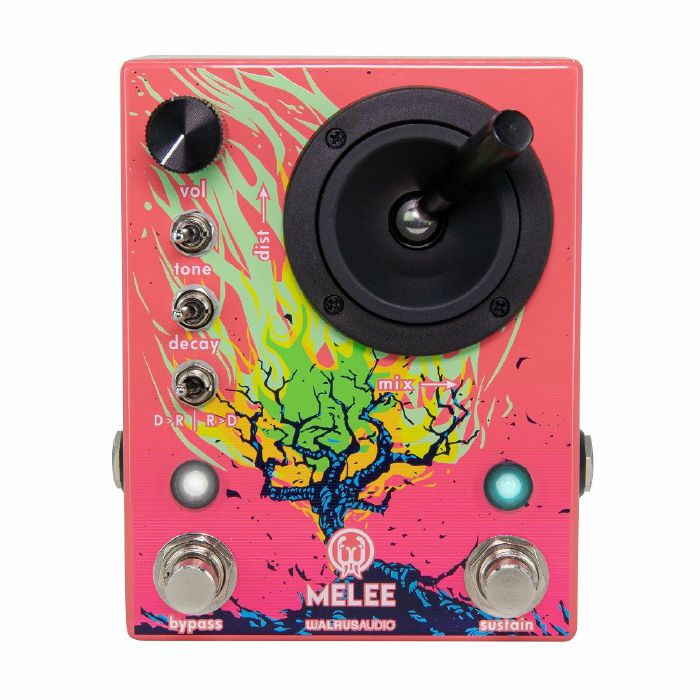
Walrus Audio give you the two most quintessential effects that yield unruly amounts of power and influence to an instrumentalist: reverb and distortion. They have been harnessed and woven together for an eternity of ethereal power with The Melee: Wall of Noise. The Melee unapologetically uses a joystick to meld reverb and distortion into one massive blaze of sound. With the flip of the order switch, run the distortion into the reverb or reverb into distortion; signal chain is your call now. For the explorer, the Melee can run one of three different reverb programs Ambient, Octave, and Reverse.
In a less is more approach, Walrus Audio have intentionally decided on controls that are fun to use and will inspire a wealth of creative output. Use the joystick to control the amount of distortion by moving it up and down. Moving the joystick left and right will adjust your reverb mix. The tone and decay toggles have low, medium, and high settings. Modulation can be added to the wet signal by holding down the bypass switch and moving the decay toggle. The left position is no modulation, the middle is a slight modulation, and the right is a high modulation.
Algorithms
The Melee is equipped with three different reverb programs, which can be changed by simultaneously pressing the bypass and sustain stomp switches. Experiment with the order toggle switch to hear how differently these all react in front and after the distortion!
Ambient Reverb (Pink LED) - Huge reverb capable of massive trails and engulfing your chords into an angry wash of sound. Great for soaring melodic lines or shoegaze-driven chord progressions.
Octave Down Reverb (Yellow LED) - Similar to the Dark mode in the Slo, you'll find an eerie lower octave hovering in the reverb trail for a nice and dark atmospheric touch.
Reverse Reverb with Feedback (Blue LED) - Add reversed reverb trails back into your signal, create gentle melodies or push into reverse feedback overload. Big, slow, and sad chords love to hang out here.
Momentary
Press and hold the sustain switch to ramp up the reverb trails. Release and the trails will ramp back down to where the decay switch is currently set. The sustain switch can also latch in all three programs. Press and release the Sustain switch to capture and sustain the current reverb decay for long pad-like sounds in your wet mix. Press again to release the latch, and the reverb trail will taper off based on the position of the decay knob.
Specs
The Melee comes coated in a glossy neon pink enclosure with white, yellow, and green inks with art by
David Huttner.
The die-cast enclosure's exact size is 3.62" x 4.79" x 3.14" (including joystick height).
Three bypass modes, DSP, DSP + True, True Bypass
Power requirements are 9VDC, centre negative (200mA minimum).
The use of an isolated power supply is recommended for powering all Walrus Audio Pedals.
Daisy chain power supplies are not recommended.
Power supply not included.
If you decide an product is not suitable within 14 days of delivery, you can return it to us for a replacement or refund. Returns must be unused and in their original, undamaged packaging.
Some items are excluded from our money back guarantee:
- Computer software that has been unsealed or registered
- Any item that comes directly into contact with the nose, ears or mouth
To arrange a return, just contact our customer service department on 020 7424 2800 or via our customer support form.
from Juno Records: Studio Equipment - New Releases https://ift.tt/vIurndC

Follow Juno Records
Juno Records delivering the inside scoop on the electronic music industry. Subscribe and get dialed in on what's really going on behind the scenes.
SPONSORS
Sourced by actual house heads who have supported the EDM scene, music, culture, and vibe collectively for decades. We're always dedicated to showing love and support for fellow artists, promoters, and supporters.

Lurid House Live and the Lurid's Playhouse formats each session for live broadcast. Enjoy the show.
ConversionConversion EmoticonEmoticon